
Truth or Dare Picker Wheel
Pick a random truth or dare by wheel
INPUTS
Related Tools: Picker Wheel, Yes No Picker Wheel, View All Tools
Truth or Dare Questions Generator – Spin the Truth or Dare Picker Wheel
- What Is Truth or Dare Picker Wheel?
- Truth or Dare Categories
- Choose Sweet, Mild, or Spicy Levels
- Mix Truth and Dare or Play Standalone
- How to Use the Truth or Dare Picker Wheel?
- Enable Mystery
- Wheel Customization?
- Type of Modes
- How to Play Truth or Dare
- Tips for a Better Truth or Dare Game
- Modify Title Section
- View All Results
- Full Screen View
- We Want to Hear Your Feedback
- FAQ About Truth or Dare Questions
- Final Thoughts
1. What Is Truth or Dare Picker Wheel?
The Truth or Dare Picker Wheel is an online truth or dare generator that helps users get random truth questions and dare challenges instantly. Instead of preparing a long list of prompts or thinking of new ideas every round, users can spin the wheel and let it choose the next question or challenge.
This tool is designed for different groups and moods. You can choose from 6 target categories: friends, kids, family, couples, boyfriend, and girlfriend. Each category includes 3 levels: sweet, mild, and spicy, so users can pick prompts that match the players and the situation.
The wheel can be used as a mixed truth or dare wheel, a truth-only wheel, or a dare-only wheel. It can draw up to 64 inputs, allowing users to mix truth and dare prompts together or play with standalone questions and challenges.
Whether you need good truth or dare questions for a party, clean prompts for kids, romantic questions for couples, or spicy truth or dare questions for a date-night game, the picker wheel makes the classic truth or dare game easier, faster, and more random.
This is one of the specialized tools from Picker Wheel, created to make random choices more interactive and fun.
2. Truth or Dare Categories
The generator includes 6 categories, so users can choose the most suitable prompts for their group.
2.1. Truth or Dare Questions for Friends
Truth or dare questions for friends are suitable for parties, sleepovers, hangouts, and group calls. This category focuses on funny, social, and playful prompts that help friends laugh, share stories, and enjoy the game together.
2.2. Truth or Dare Questions for Kids
Truth or dare questions for kids should be simple, safe, and age-appropriate. This category focuses on clean questions, imagination, favorite things, silly actions, and harmless dares.
For kids, even the spicy level should remain child-friendly. In this category, “spicy” means more energetic or funny, not adult or inappropriate.
When playing online or with younger children, parents and teachers may also refer to trusted child safety resources such as NSPCC Online Safety and UNICEF’s online safety guidance.
2.3. Truth or Dare Questions for Family
Truth or dare questions for family are made for mixed-age groups. The prompts should be clean, warm, funny, and comfortable for everyone.
This category works well for family game nights, birthday gatherings, holiday activities, reunions, and weekend fun.
2.4. Truth or Dare Questions for Couples
Truth or dare questions for couples are useful for date nights, anniversaries, long-distance calls, and romantic games at home.
This category can include sweet, playful, meaningful, or spicy prompts depending on the level selected. It helps couples start conversations, create fun moments, and learn more about each other.
2.5. Truth or Dare Questions for Boyfriend
Truth or dare questions for boyfriend are suitable for cute, romantic, funny, or flirty games. They can be used during texting games, video calls, casual dates, or couple challenges.
Users can choose the sweet level for soft romantic prompts, the mild level for playful prompts, or the spicy level for a bolder game.
2.6. Truth or Dare Questions for Girlfriend
Truth or dare questions for girlfriend are designed for sweet, thoughtful, playful, and romantic moments. This category helps create fun conversations and light couple bonding.
It is suitable for date nights, online chats, relationship games, or simple moments when you want something fun to do together.
3. Choose Sweet, Mild, or Spicy Levels
Each category includes 3 levels to control the tone of the game.
3.1. Sweet
Sweet prompts are light, kind, and easy to answer. They are suitable for kids, family, new friends, and couples who want a gentle game.
3.2. Mild
Mild prompts are more playful and slightly more challenging. They work well for friends, parties, sleepovers, and casual couple games.
3.3. Spicy
Spicy prompts are bolder and more exciting. They are best for close friends, couples, boyfriend, or girlfriend games where everyone is comfortable with stronger prompts.
For users searching for truth or dare questions spicy enough for a date night or close-friend game, this level can make the round more interesting. For kids and family categories, spicy prompts should still stay safe, clean, and age-appropriate.
4. Mix Truth and Dare or Play Standalone
The Truth or Dare Picker Wheel can be used in different ways. Users can mix truth and dare prompts together, or they can play with only truth questions or only dare challenges.
A mixed wheel makes the game more surprising because players do not know whether they will get a question or a challenge. A truth-only wheel is better for conversation games, while a dare-only wheel is better for active party games.
With support for up to 64 inputs, users can create a larger custom wheel for longer games and group activities.
5. How to Use the Truth or Dare Picker Wheel?
You can use this truth or dare generator whenever you want. All you need to do is to spin the wheel and get a random truth question or dare challenge. This way, you can let the wheel make the selection and keep the game fair and exciting.
Below are the steps to use this Truth or Dare Picker Wheel.
-
Choose type.
- Truth.
- Dare.
- Truth and Dare.

Then, set the number of truth questions and dare challenges you want to include in the wheel.
-
Choose the category.
- Friends/ Couples/ Kids/ Family/ Party/ Extreme.
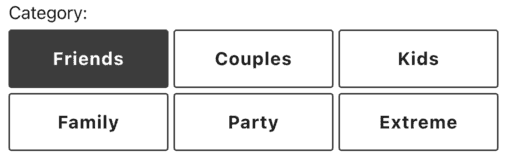
- Friends/ Couples/ Kids/ Family/ Party/ Extreme.
-
Choose the level.
- Mixed/ Sweet/ Mild/ Spicy.

- Mixed/ Sweet/ Mild/ Spicy.
-
Click the Preview List button to view the generated list.

-
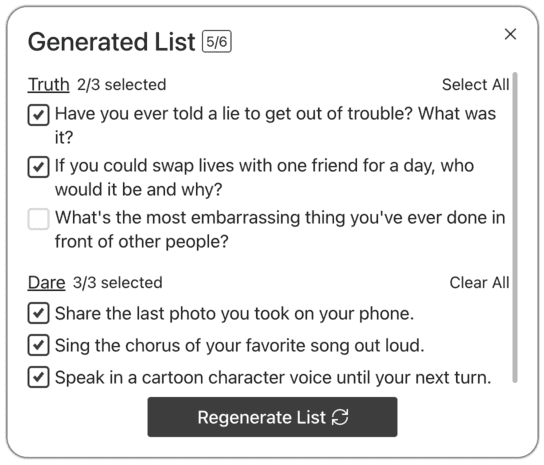
In the generated list, you can tick or untick each truth question or dare challenge to show or hide it from the wheel. Click the "Select All" or "Clear All" button to quickly show or hide all questions and challenges.
-
Click the "Regenerate List" button to generate a new set of questions and challenges.


-
Click the "SPIN" button or press "Ctrl + Enter" keys to start spinning the Truth or Dare Wheel.

-
A randomly selected question or challenge is displayed in a pop-up window.
-
Decide on an action mode. (Modes are explained below.) Want to hear the result? Simply click “Read Aloud.”

-
The result is also stored in "All Results" section.
-
Continue with the next spinning.
-
Click the Shuffle button to shuffle the inputs.

-
Click the toggle button to hide the Inputs section and shift the wheel to the center.

6. Enable Mystery
You can enable Mystery Wheel or Mystery Result:

- Mystery Wheel – replaces all inputs on the wheel with “?”
- Mystery Result – hides the result until you press Enter or click to reveal
7. Wheel Customization?
To suit your preferences, you may apply a variety of modifications or settings to this truth or dare wheel.
It's easy to do so by clicking the Settings button at the page header, or inside the Menu button on mobile. The Settings section will appear on the right side of the wheel, or at the bottom of the wheel on mobile.

You can change the following settings:
- Spin Behavior
- Spinning speed (lvl1 to lv10).
- Spinning duration (1s to 30s).
- Enable manual stop button.
- Spin count
- Random initial angle.
- Initial Spinning
- Spin button animation and color-changing.
- Sound
- Sound on/off.
- Customize starting, spinning, and ending sounds.
- Result
- Disable/Enable confetti.v
- Page Color - Change the background color of the whole section.
- Tool Background
- Change the background transparency of the wheel section.
- Add a background image at the wheel section. (Premium Users)
- Tool Colors - Change the wheel colors with several themes provided.
- Spin Button - Customize your own spin button. (Premium Users)
- Banner | Logo - Adding your own logo or banner. (Premium Users)
*Customize wheel with your own wheel sounds, colors and background color. (Premium Users)
8. Type of Modes
If you have previously used our main Picker Wheel to spin the wheel, you will find that Action Mode offers the same core functionality.
8.1. Normal Mode - [DONE]
In this mode, the selected truth and dare options will stay the same as in your previous spin.
8.2. Elimination Mode - [HIDE CHOICE]
In Elimination mode, the truth or dare randomizer removes the selected result from the list for the next spin. The "All Results" section will show the eliminated results.
8.3. Accumulation - [ADD COUNT]
When you enable accumulation, the selected result’s count will increase and the updated count is carried forward to the next spin. The Score tab in the All Results section will show the accumulated counts.
9. How to Play Truth or Dare
To play truth or dare, players take turns answering a truth question or completing a dare challenge. Spin the Truth or Dare Picker Wheel to randomly generate a prompt for each round.
You can also add other ways to randomize the game. Use the Yes No Picker Wheel to decide whether a player must spin, or use real-world poker cards to choose who plays next. You can also use real-world poker cards to choose who plays next: assign each player a card, draw one card randomly, and the matching player takes the turn.
10. Tips for a Better Truth or Dare Game
A good truth or dare game should be fun, fair, and comfortable for everyone. Before starting, choose the right category and level for your group.
It is also a good idea to allow players to skip a prompt if they feel uncomfortable. The goal is to make the game enjoyable, not stressful.
11. Modify Title Section
Everyone will understand the objective of your truth or dare wheel if you write your own title.
You can change the tool title, tool description and result title by clicking the Title Button from the Inputs section.

And write down the texts.
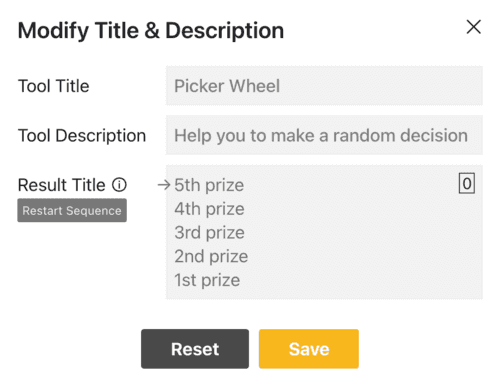
The result title supports multiple titles. The arrow points to the title that will be displayed on the next spin, cycling in order — for example, Spin 1 shows Title 1, Spin 2 shows Title 2, and after the last title, it loops back to Title 1. Click Restart Sequence to reset the arrow to Title 1.
The tool title and description will appear in the upper left corner, while the result title will appear after the result is announced, as seen below.


12. View All Results
Click the "Show All Results" button to see all of your previous results.

It will display all of the decisions that the wheel has determined since the first spin of your current visit.
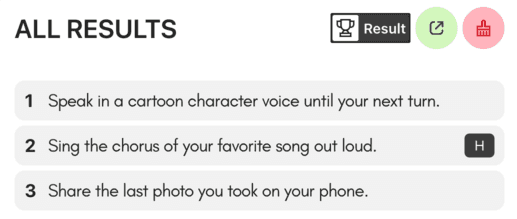
You can click the toggle button to switch between viewing results or scores (the accumulated count of results).

You can click the "Results Link" button to open the results page where you can share it with other people.

You can clear all the records by clicking the "Clear Results" button.

13. Full Screen View
By hitting the full-screen button, you can also get into or out of full-screen mode.(Available in a tablet and desktop device only)

The truth or dare spinner will be enlarged and the inputs section will be hidden when you go to full-screen mode.
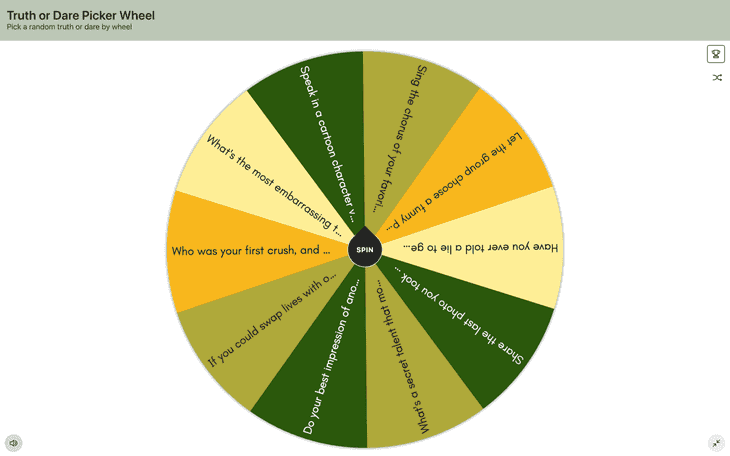
The "Show All Results" button will still show you your results.
14. We Want to Hear Your Feedback
If you have any feedback or discover any bug on our random truth or dare generator. Please response to us as well. We may take your feedback to make the Truth or Dare Picker Wheel becoming better.
15. FAQ About Truth or Dare Questions
What are good truths for truth or dare?
Good truths are questions that are interesting, honest, and suitable for the group. They can be funny, personal, sweet, romantic, or thoughtful depending on the category and level selected.
What are good dares for truth or dare?
Good dares are safe, fun, and easy to complete. They should make the game more entertaining without making the player feel too embarrassed or uncomfortable.
What is a truth or dare wheel?
A truth or dare wheel is a random spinner that selects truth questions or dare challenges for players. It also works like a truth or dare generator because it helps users get random prompts instantly without preparing their own list.
Are spicy truth or dare questions suitable for everyone?
No. Spicy truth or dare questions are better for close friends, couples, boyfriend, or girlfriend games. For kids and family games, spicy prompts should stay clean, safe, and age-appropriate.
Can I play truth or dare online?
Yes. You can play truth or dare online by using the Truth or Dare Picker Wheel during a video call, chat, or virtual party. Players can take turns spinning the wheel and following the prompt shown.
16. Final Thoughts
The Truth or Dare Picker Wheel makes the classic truth or dare game easier to play online. With categories for friends, kids, family, couples, boyfriend, and girlfriend, plus sweet, mild, and spicy levels, users can quickly generate prompts that fit their group.
Whether you need good truth or dare questions for friends, clean questions for kids, romantic prompts for couples, or spicy prompts for a date-night game, this generator helps keep each round simple, random, and fun.
Let’s pick a random Truth or Dare from the Truth or Dare Wheel! Have fun!


Flip a coin to make a decision?
Try FlipSimu Coin Flipper->